

It is 7:40 on a Monday. You are counting the drawer and the phone rings: a new caller with a tooth that hurt all weekend, calling three offices this morning. What your front desk says in the next ninety seconds decides whether that patient books with you or the practice down the street. No software fixes that moment. A good script does.
Short answer: The calls that fill or empty your schedule are predictable, so the words should be too. This guide gives you seven word-for-word scripts, from the new-patient inquiry to the missed-call text, each with the way it breaks and the HIPAA and TCPA lines you cannot cross. Hand them to the team.
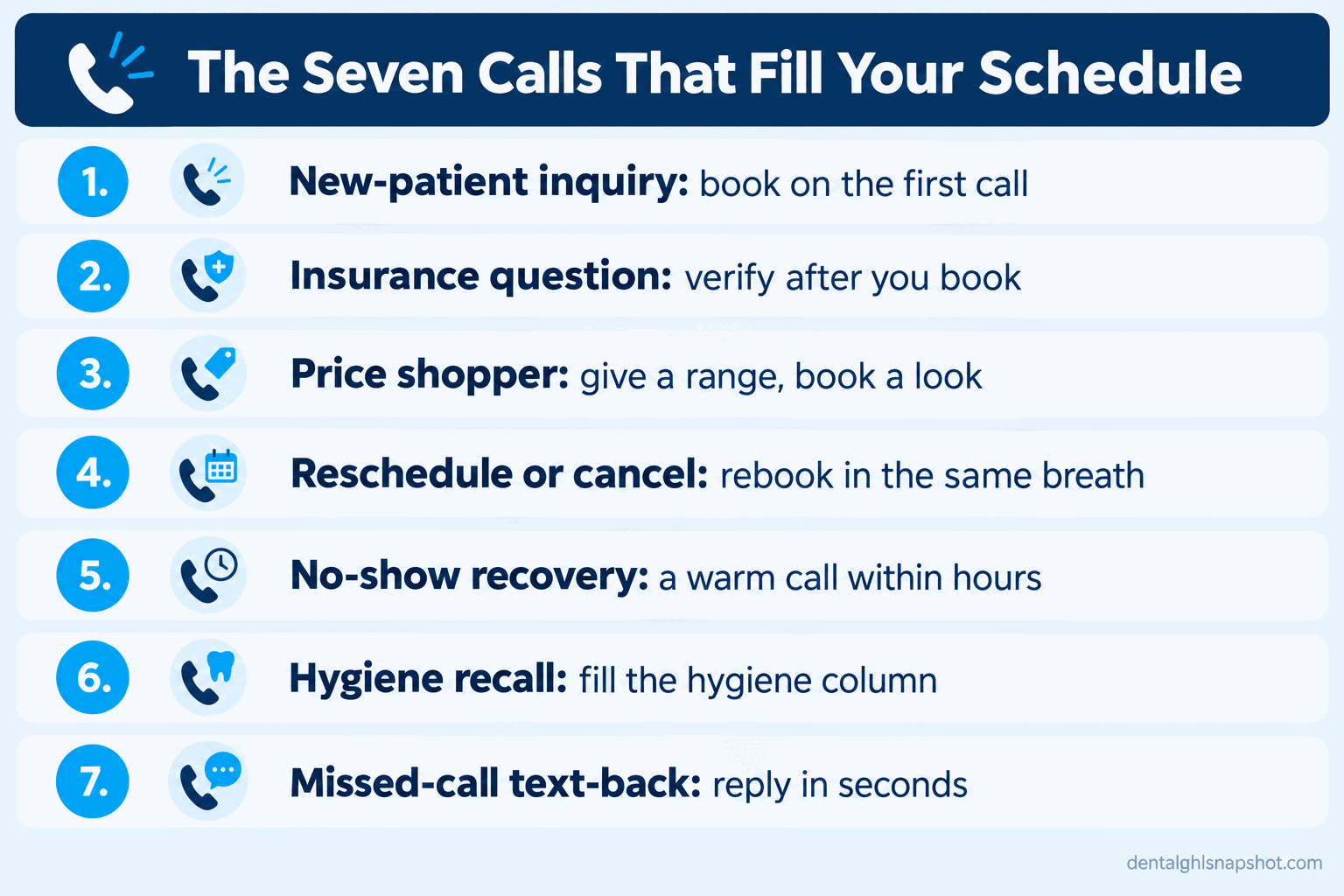
Table of contents
- Why the phone decides your schedule
- The seven calls that fill or empty the book
- Script 1: the new-patient inquiry call
- Script 2: the “do you take my insurance?” call
- Script 3: the price shopper
- Script 4: the reschedule and cancellation call
- Script 5: the no-show recovery call-back
- Script 6: the hygiene recall call
- Script 7: the missed-call text-back
- Running the scripts: solo, mid, and large
- The compliance lines you cannot cross
- Objections, answered honestly
- FAQ
Why the phone decides your schedule
Your practice-management software never answers the phone. People do, and the gap between a full practice and a quiet one is often not marketing spend but what happens on the calls you already get. The pressure is getting worse. One in three dentists told the ADA Health Policy Institute in the first quarter of 2026 that their practice was not busy enough, up from one in four two years earlier (ADA HPI). Meanwhile the average general practice billed $942,290 in 2024 (ADA Survey of Dental Practice). Every one of those dollars started with a person reaching out, so fumble the reach-out and the production never shows up.
Share of U.S. dentists reporting their practice is not busy enough, approximate. Source: ADA Health Policy Institute, State of the U.S. Dental Economy.
The calls that decide your week are the same seven every week. Script them and the team stops improvising on the calls that matter most.
The seven calls that fill or empty the book
Three rules run through all of them. One: the goal is a day and a time, not “information,” so every script ends by offering two specific times. Two: get the mobile number and permission early, because you cannot text a reminder to a number you do not have (“is it alright if we text you reminders at this number?”). Three: warmth first, logistics second, because people in a dental office are often nervous or in pain, so acknowledge them before you interrogate them.
Script 1: the new-patient inquiry call
This is the most valuable call you get, and the most often lost to a long hold or a flat “we have an opening in three weeks.” Speed and warmth win it (speed-to-lead for dental practices).
How this breaks: The team puts the new caller on a long hold, or recites the whole insurance speech before booking, and either one gives the caller time to dial the next office. Book the appointment first, then verify benefits after the slot is held.
Script 2: the “do you take my insurance?” call
This call sinks when the front desk says “let me check and call you back,” which ends it, or promises coverage it cannot guarantee, which starts a billing fight later. Stay in control of the appointment while being honest about benefits.
If the practice is out of network, say so plainly and pivot to value: “We are out of network with that plan, which means we are not restricted on your treatment, and we will still file the claim and estimate your out-of-pocket up front.”
How this breaks: Staff quote a specific coverage percentage off the top of their head. Never do that; the verification happens before the visit, and the script promises exactly that. Automating it is one of the biggest time savers a front desk can get (automating insurance verification), and it sets up the Q4 rush (the year-end benefits playbook).
Script 3: the price shopper
“How much is a crown?” is not a trap, it is a buying signal from someone nervous about cost. A flat number with no context turns the call into a race to the cheapest office; the right answer gives a range, anchors on value, and books a look.
How this breaks: The team refuses to give any number, which feels evasive, or blurts a single figure, which commoditizes you. Shoppers who feel understood book; ones who get only a number shop on. If cost is the real barrier, mention membership or financing, which pairs with lifting case acceptance through follow-up and financing.
Script 4: the reschedule and cancellation call
A patient calling to cancel is not lost yet. They are on the phone right now, the best moment you will ever have to rebook, so do not say “okay, call us when you know your schedule.”
The short-notice line also feeds your cancellation-fill process (how to fill dental cancellations).
How this breaks: The front desk accepts the cancellation and hangs up without rebooking, which is how recall gaps open. Make “cancel” trigger an immediate “let us move it.”
Script 5: the no-show recovery call-back
A patient who no-showed is embarrassed, and embarrassment makes people avoid the practice entirely. The call that recovers them is not a scolding but a warm door held open, made within a few hours while the day is still fresh.
The tone does the work: “we missed you” and “is everything okay” lower the wall, then you rebook. If you only reach voicemail, keep it compliant: name, practice, callback number, nothing about the procedure (why patients no-show after confirming).
How this breaks: The call never happens, or it happens two days later with a fee-first tone that confirms the patient’s fear they are in trouble. Fast and kind rebooks far more chairs than slow and stern.
Script 6: the hygiene recall call
The overdue hygiene patient is the warmest list you own. They know you, like you, and simply fell off the schedule. The recall call is a reminder, not a sale, so it should sound effortless (the recall and reactivation playbook).
Warm, specific, ends with two times. If they are not ready, capture permission to text and let the recall sequence carry it.
How this breaks: The call turns into a guilt trip (“you really should have come in months ago”), or the team gives up after one unanswered attempt. Recall is a sequence, so let a text follow a missed call rather than treating one try as a no.
Script 7: the missed-call text-back
You will not answer every call. The 7:40 rush, the lunch gap, and after hours are when the phone rings and no one is free, and silence just sends that caller to the next office. An instant text turns a missed call into a saved one (missed-call text-back for dental).
It works because it goes out within seconds and invites a reply instead of asking them to call again, so the thread lets the desk book without a single ring (two-way texting for dental practices).
How this breaks: The text goes out an hour later, when the caller has already booked elsewhere, or it reads like a robot and gets ignored. Speed and a human tone are the whole game, and the number has to be a real mobile with permission, which is what Script 1 captures.
Running the scripts: solo, mid, and large
The seven scripts are the same everywhere. Who runs them, and how you keep them from slipping, changes with team size.
How to run the scripts by practice size
| Plan | Solo (1 dentist, 1 hygienist, 1-2 staff) | Mid (1-2 dentists, 2-3 hygienists, 3-4 staff)Recommended | Large (multi-provider or multi-op) |
|---|---|---|---|
| Price | Scripts + text-back | Scripts + roles | Scripts + measurement |
| Feature 1 | One person owns the phone, so a missed-call text-back is non-negotiable | Assign a call owner per shift so new-patient calls are never on hold | Standardize all seven scripts and onboard new hires on them |
| Feature 2 | Tape the new-patient and insurance scripts by the phone | Weekly 10-minute role-play on one script until it is natural | Track booked-from-call rate and listen to a sample weekly |
| Feature 3 | Let automation run recall and reminders, not repeat calls | Short-notice list + text-back fill cancellations fast | Automate overflow so peak-hour calls never hit a dead line |
The smaller the team, the more the text-back has to catch what a person cannot; the bigger the team, the more you standardize the scripts and spot-check a few calls a week to stop drift (why the front desk keeps missing calls).
The compliance lines you cannot cross
Scripts also keep people from oversharing, which is where front desks get into trouble. Two bodies of rules apply to every call, voicemail, and text.
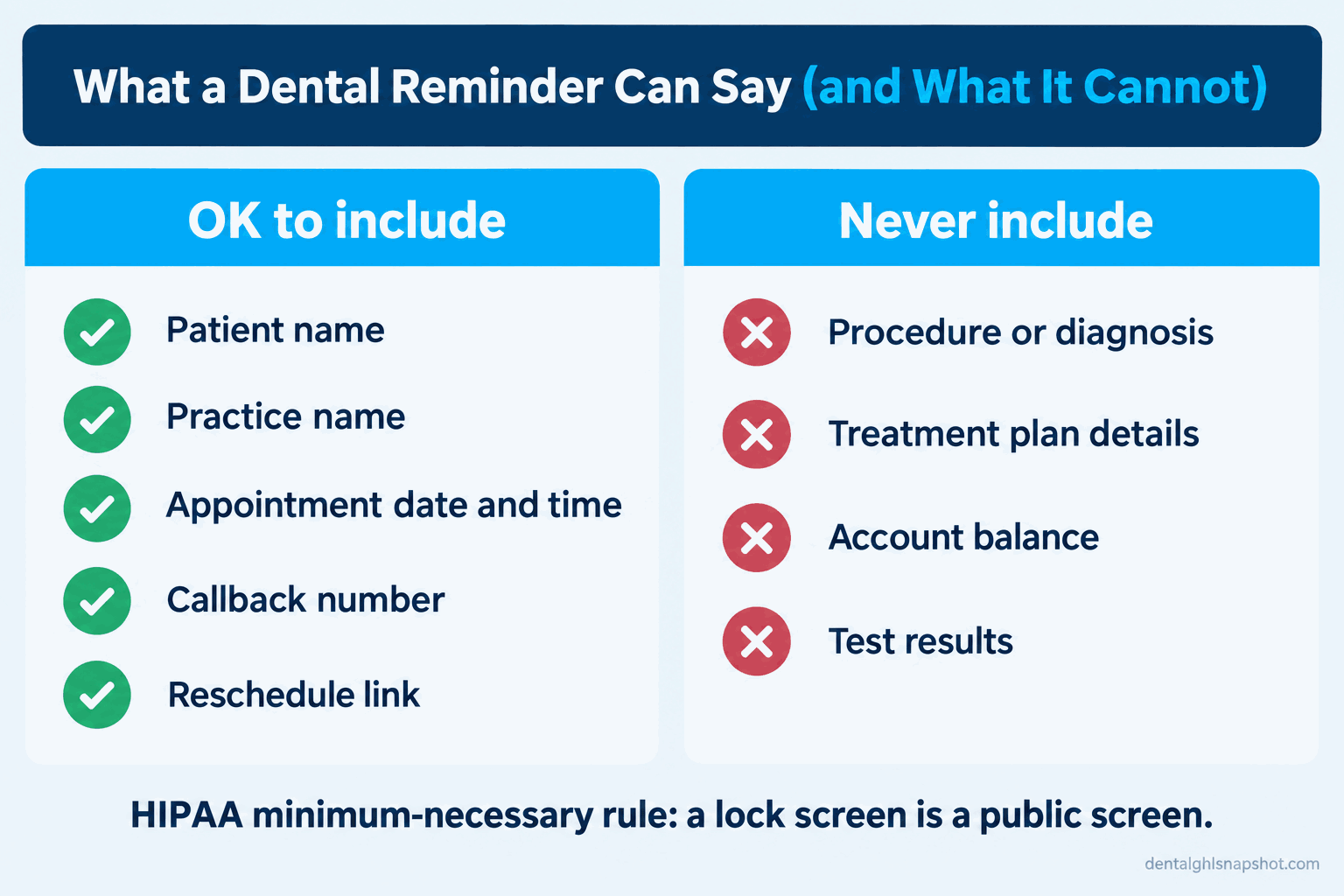
HIPAA governs what you say and leave. Appointment reminders are allowed without a separate signed authorization, because they count as part of treatment (HHS Office for Civil Rights). But a lock screen is a public screen, and so is a voicemail someone else might hear. A message may carry the name, practice, date, time, and a callback number, nothing clinical. “This is [Practice] with a reminder about your appointment Tuesday, please call [number]” is fine; “reminder about your root canal and the $380 balance” is a violation. Any vendor that touches patient information needs a signed Business Associate Agreement.
TCPA governs calls and texts to mobiles. When a patient hands your office a mobile number, that act counts as consent for healthcare messages like reminders and recall (FCC). That consent covers care, not marketing or billing, which need their own opt-in. Every automated text must offer a clear opt-out and honor a “STOP” promptly, which is why Script 1 asks permission and Script 7 includes the STOP line (the dental patient texting compliance guide).
How this breaks: A team member reads the full chart note onto a voicemail, or a reminder text spells out the procedure. Keep the rule simple: name, practice, date, time, callback, a way to opt out, and nothing clinical in any message that could be overheard or seen.
Objections, answered honestly
“Scripts make my team sound like robots.” Only if people read them verbatim with no personality. A script is a floor, the reliable moves you cannot get wrong, like the two-times close and the texting permission. Train it until it is muscle memory, then let each person sound like themselves. The best front desks sound calm, not scripted, because they are never guessing.
“We are too busy to follow a script on every call.” Busy is when scripts earn their keep. A ringing phone and a patient at the desk is exactly when people freeze, overshare, or forget to book, and a script removes the thinking so a flustered team member still books.
“Do I need new software to use these?” No. Every script here works with a phone and a notepad, so put them to work today. An answering service only takes a message; it rarely books, captures texting permission, or replies instantly. Software earns its place only when a human cannot pick up, or when a one-time call should become an automatic sequence like recall.
Frequently asked questions
What is the most important dental front desk phone script?
The new-patient inquiry call. It is the highest-value call you get and the one most often lost to a long hold or a slow quote. Acknowledge the caller, capture a mobile number and texting permission, offer two specific times, and confirm by text. Everything else protects a patient you already have; this one wins a new one.
What should I say when a caller asks if we take their insurance?
Confirm you work with most PPO plans and verify exact benefits before the visit, then book the appointment and run the verification afterward. Never quote a specific coverage percentage off the top of your head, because an inaccurate quote creates a billing dispute later. If you are out of network, say so plainly and pivot to unrestricted treatment plus a filed claim and an up-front estimate.
How do I handle a dental price shopper on the phone?
Give an honest range rather than refusing or blurting a single number. Explain the figure depends on what the tooth needs, offer a no-obligation exam, and close by offering two times. Shoppers who feel understood often book; ones who get only a number keep shopping.
What can I legally leave on a patient's voicemail?
The patient's name, your practice name, the appointment date and time, and a callback number. Appointment reminders are permitted under HIPAA as part of treatment, but the minimum-necessary rule means you leave out anything clinical: no procedure names, diagnoses, or balances. Assume someone other than the patient might hear it.
Do I need patient consent to text appointment reminders?
When a patient gives your office a mobile number, that act is treated as consent for healthcare messages like reminders and recall under the FCC's rules. That consent covers care, not marketing or billing, which need separate opt-in. Every automated text must offer a clear opt-out and honor a STOP reply promptly.
Should every call follow a script word for word?
No. Use the script as a floor for the non-negotiable moves: capture the number, get texting permission, offer two times, and keep clinical details out of any message. Train it until it is natural, then let each team member sound like themselves.
The bottom line
Back to 7:40 on Monday and that phone ringing. The practice that books that caller is not the one with the biggest ad budget; it is the one whose front desk knows what to say: acknowledge the pain, get the number and permission, offer two times, confirm by text. All seven scripts cost nothing and you can hand them to the team this afternoon. Then close the gap words cannot reach, the calls nobody could answer and the follow-ups no human should make by hand. If you would rather have that layer built for you, see what the done-for-you snapshot includes.