

It is 7:52 on a Monday. The office is not open yet, but the phone is already ringing. There is a weekend voicemail, two new-patient forms in the inbox, a stack of insurance verifications for this week’s hygiene column, a text cancellation, and a patient at the counter who needs to reschedule. One person at the desk, maybe two, and it all has to happen in the next twenty minutes.
That is not a problem you can hire your way out of quickly. Dental front desk automation is the lever you can pull this month: software that handles the repetitive, time-boxed work so your people can handle the calls and patients that need a human. This guide covers the seven front-office tasks to automate first, how each works, the message copy you can steal, and the HIPAA and TCPA lines you cannot cross.
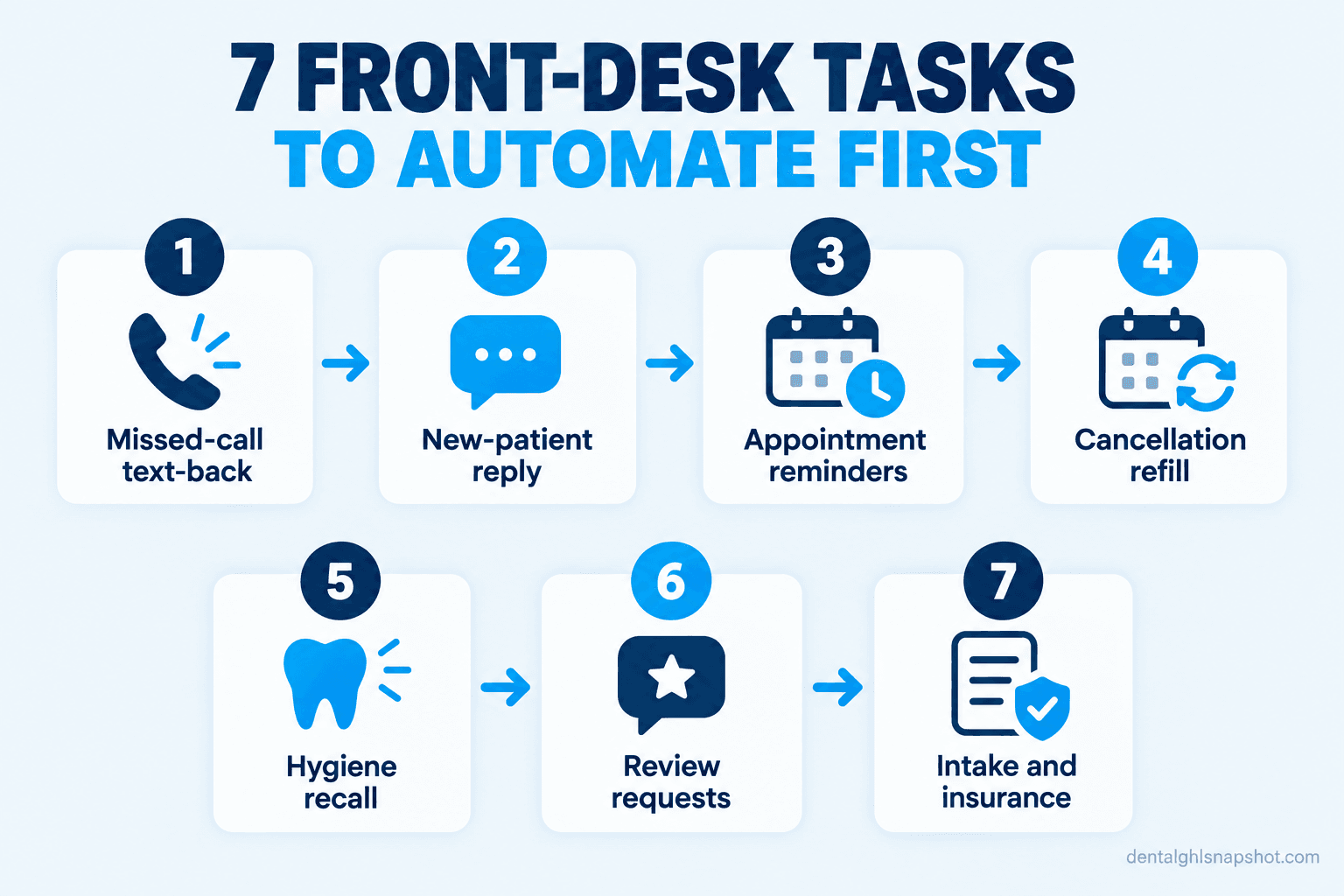
Table of contents
- Why the front desk is your most expensive seat
- Task 1: text back the calls nobody could answer
- Task 2: reply to new-patient leads in seconds
- Task 3: run reminders on autopilot
- Task 4: fill the holes cancellations leave
- Task 5: nudge overdue hygiene patients back
- Task 6: ask for the review without breaking the rules
- Task 7: send intake and insurance prompts before the chair
- What to automate first, by practice size
- The compliance lines automation has to respect
- Objections, answered honestly
- FAQ
Why the front desk is your most expensive seat
Your practice-management software does not book patients. Your front desk does. Every one of the $942,290 the average general dentist billed in 2024 started with a person reaching out (ADA Survey of Dental Practice). When the desk is buried, the reach-outs get fumbled and the production never lands on the schedule.
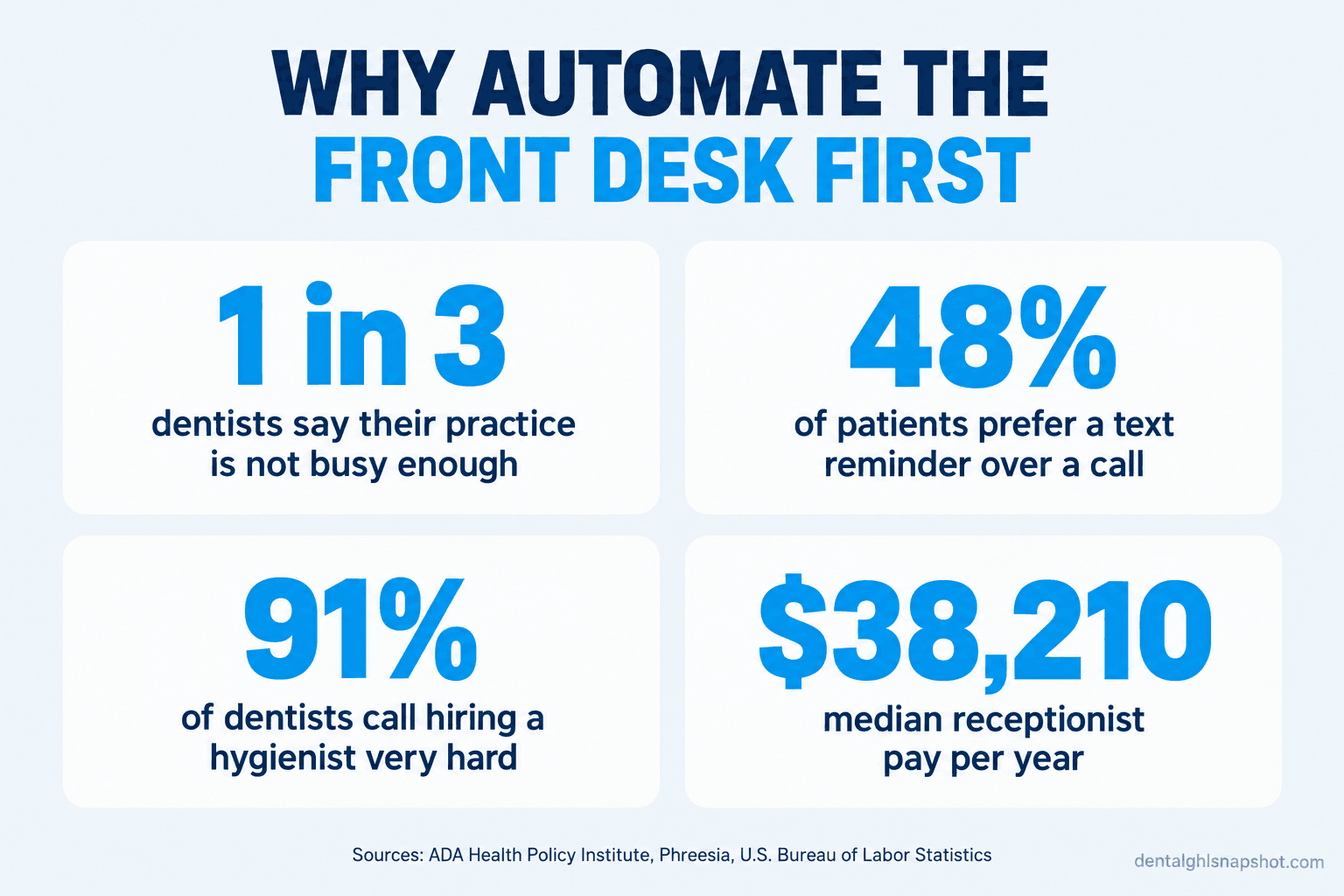
The pressure is rising. One in three dentists told the ADA Health Policy Institute in early 2026 that their practice was not busy enough, up from one in four two years earlier (ADA HPI). A practice that is not busy enough cannot afford to send a new caller to voicemail or let a hygiene patient drift away. Yet that is what a slammed front desk does, because one person holds only one line at a time.
The instinct is to hire, but recruiting is slow and costly right now. Only about 60% of dentists say they have adequate staff, and 91% of those recruiting called it very or extremely challenging (ADA HPI). A hire is not cheap either: the median receptionist earned about $38,210 a year as of May 2024, before taxes, benefits, and training (Bureau of Labor Statistics). That is a long search to do work a machine can do faster, at every hour.
How patients say they prefer to get appointment reminders, from a survey of roughly 14,000 patients. Source: Phreesia.
There is a second reason to start at the desk: patients already prefer it. Nearly half would rather get a text reminder than a call or email (Phreesia), so automating it is the channel most would have picked, not a downgrade.
Task 1: text back the calls nobody could answer
The highest-return automation is missed-call text-back. When a call comes in that no one can pick up, the lunch gap, the morning rush, after hours, the system instantly texts that caller instead of leaving silence and a reason to dial the office down the street (missed-call text-back).
Setup: Connect it to the main line so any unanswered call triggers the text within seconds, and route replies into the inbox the desk already watches.
How this breaks: The text goes out an hour later, after the caller has booked elsewhere, so speed is the whole game. And replies that land in an inbox nobody checks are a saved patient ignored, so give one person per shift that thread.
Task 2: reply to new-patient leads in seconds
A new patient who fills out your form or sends a DM is the most valuable lead you get, and the most perishable. The office that answers first usually wins, because the patient messaged three practices at once (speed-to-lead for dental practices), and a human cannot sit on the form around the clock. Automation can.
Setup: Trigger the reply the instant a form, Instagram DM, or Facebook message arrives, with a booking link for self-schedulers, and tag the lead for a personal follow-up next morning.
How this breaks: The reply sounds like a robot and gets ignored, so write it the way a friendly team member would text. It also breaks when the booking link is broken, so test it monthly.
Task 3: run reminders on autopilot
Reminders are the most obvious automation and still the most often done badly. One text the day before is not a system. A short ladder is: a confirmation at booking, a reminder a few days out, and a nudge the day before, each inviting a reply (why patients no-show after confirming).
Setup: Sync it to your schedule so reminders fire off real appointment data, make every message two-way, and keep each to the date, time, provider, and a link.
How this breaks: The reminder carries clinical detail (“reminder about your root canal”), which breaks the minimum-necessary rule on a lock screen, so keep every message clinical-free. It also breaks when a “confirm” reply goes nowhere, so route confirmations back into the schedule.
Task 4: fill the holes cancellations leave
A confirmed schedule still springs leaks. Someone cancels at 8am for a 10am slot, and that chair sits empty unless a person has time to work the phone. An automated short-notice list fixes it: patients who wanted an earlier slot get a text the moment one opens, first to reply takes it.
Setup: Tag patients who ask for earlier openings or who are overdue, and when a cancellation hits, text a small batch and book the first YES. Close the slot the instant it fills so two patients cannot claim it.
How this breaks: You text twenty people, three say yes, and two feel brushed off when the slot is gone. Text a small batch, and send a gracious “that one filled, I will keep you posted.”
Task 5: nudge overdue hygiene patients back
The overdue hygiene patient is the warmest list you own. They know you, they like you, they just fell off the schedule. A recall automation works that list the way no busy desk ever will by hand, a gentle, repeating cadence instead of a single call that never happens (the recall playbook).
Setup: Pull the overdue list from your practice-management software on a schedule, enroll each patient automatically, capture texting permission, and stop the sequence the instant a patient books.
How this breaks: The cadence turns naggy, three texts in three days, and patients opt out, so space the touches over weeks and cap them. And a sequence that keeps running after a patient books is the fastest way to annoy a loyal patient, so “stop on booking” is non-negotiable.
Task 6: ask for the review without breaking the rules
Reviews are won or lost in the hours after a good visit, exactly when the desk is too busy to ask. Automation sends the request at the right moment, every time. It is also the one automation with a legal trap built in.
Setup: Trigger the request a couple of hours after the appointment is marked complete, send the same message to every patient, and link to your public Google profile. One ask, maybe one follow-up.
How this breaks: The practice sends the link only to patients it thinks are happy, or screens by a satisfaction score and routes happy ones to Google and unhappy ones to a private form. That is review gating, and the FTC treats it as deceptive (FTC). Ask everyone, and let the reviews be what they are.
Task 7: send intake and insurance prompts before the chair
The least glamorous automation saves the most desk hours: moving intake and insurance ahead of the visit. Instead of a clipboard and a scramble to verify a plan while the hygienist waits, the patient gets a digital form and the team gets a prompt to verify eligibility on a fixed timeline, which keeps your receivables clean (the insurance verification checklist).
Setup: Fire the intake link a few days before the appointment, capture the insurance card in the same flow, and trigger an internal task to verify benefits on your timeline so it is a scheduled step, not a scramble.
How this breaks: The form is long, mobile-hostile, or asks for clinical detail over insecure channels, so patients abandon it. Keep it short, make it work on a phone, and use a secure link for anything sensitive, never plain SMS. And give the verification task an owner.
What to automate first, by practice size
The seven tasks are the same everywhere. Which to turn on first, and how much a human still carries, changes with the size of your team.
Where to start, by practice size
| Plan | Solo (1 dentist, 1 hygienist, 1-2 staff) | Mid (1-2 dentists, 2-3 hygienists, 3-4 staff)Recommended | Large (multi-provider or multi-op) |
|---|---|---|---|
| Price | Start with 1, 3, 5 | Add 2, 4, 7 | Run all 7, measure |
| Feature 1 | Missed-call text-back first, one person cannot hold line and counter | Instant new-patient lead replies so no inquiry waits for morning | Run the full set across every provider and location |
| Feature 2 | Automated reminders next, to cut no-shows without a second caller | Short-notice cancellation fill to protect the hygiene column | Review requests at scale to build the public profile |
| Feature 3 | Recall sequence third, to mine the list you never have time to call | Move intake and insurance ahead of the visit to free the desk | Track reply rate, booked-from-text rate, and opt-outs weekly |
| Feature 4 | Keep new-patient calls human; let automation catch what you miss | An owner per automation so replies never sit unread | Standardize the copy so the brand voice stays consistent |
The smaller the team, the more automation has to catch what a person cannot reach; the bigger the team, the more it is about consistency and measurement (why the front desk keeps missing calls). What cannot be automated, the warm new-patient call, the financial talk, is where your people should spend the time it frees. If that is still too much, a trained dental front-desk VA can run the human side.
The compliance lines automation has to respect
Automating patient messages means three rulebooks apply to every text, email, and voicemail your software sends. Get them right once at setup and they run safely.
For the full detail on consent language, see the dental patient texting compliance guide. The short version: name, date, time, link, an easy opt-out, and nothing clinical.
Objections, answered honestly
“Won’t patients hate automated texts?” Only when they are naggy, robotic, or constant. Patients prefer a text reminder to a call by nearly two to one (Phreesia). Write in a human voice, cap the cadence, stop the second they book, and include an opt-out.
“I already pay for Dentrix (or Eaglesoft, or Open Dental). Isn’t this covered?” Your practice-management software runs the clinical and billing record. It is not built to text a missed caller in seconds, reply to a midnight DM, or run a multi-touch recall across SMS and email. Those tasks live in a layer on top of the PMS, which is why reminders and recall are usually a separate tool anyway (what dental software really costs).
“Do I need to be technical to run this?” No. The decisions are yours, which tasks to automate and what the messages say; the wiring is a one-time setup. On a done-for-you system it is built and tested for you, and from then on you approve message copy, not code.
Frequently asked questions
What is dental front desk automation?
It is software that handles the repetitive, time-boxed front-office tasks that are the same every time: texting back a missed call, replying to a new-patient lead, sending reminders, filling cancellations, running recall, requesting reviews, and sending intake and insurance prompts. It does not make clinical decisions or replace the human calls that need warmth; it covers the hours a person cannot.
Which front desk task should a small practice automate first?
Missed-call text-back. In a solo or small practice, one person cannot hold the phone and the front counter at once, so calls get missed during the morning rush, the lunch gap, and after hours. An instant automated text to every missed caller turns a lost call into a booked patient, and it is usually the highest-return automation to turn on.
Will automating front desk tasks let me avoid hiring?
Often it lets you delay or avoid an added front-desk hire, which matters because recruiting is slow and costly right now. It adds capacity by removing repetitive work from your existing team, not by replacing clinical staff or the human judgment a front desk still needs.
Is it legal to send automated texts to dental patients?
Yes, within rules. Under the FCC's reading of the TCPA, a patient handing your office a mobile number is treated as consent for healthcare messages like reminders and recall. HIPAA allows appointment reminders as treatment, but a message may carry only the name, date, time, provider, and a link, nothing clinical, because a lock screen is public. Every text must offer an opt-out and honor STOP.
How do I keep automated review requests compliant?
Send the same review request to every patient after their visit and link straight to your public Google profile. Never ask only patients you think are happy, and never screen by a satisfaction score before deciding who gets the link. The FTC treats that review gating as deceptive. Asking everyone is the legal path and the one that builds a profile patients trust.
The bottom line
Back to 7:52 on Monday, the phone ringing, the forms waiting, the cancellation that just came in. The practice that handles all of it is rarely the one with the biggest team. It is the one where the repetitive work runs itself, so the two people at the desk can actually talk to the patient in front of them.
Start with the task bleeding the most. For most practices that is the missed call, so turn on text-back first, then add reminders and recall, then the rest as each proves out. You do not need a bigger team to stop the leaks. You need the repeatable work off your people’s plates, so the humans you have are free for the work only humans can do. If you would rather have the whole layer built for you, see what the done-for-you dental snapshot includes.