
Short answer: You migrate an Atlanta dental practice to GoHighLevel the same way you’d move an occupied house — you set up the new place before you leave the old one. Build the GHL sub-account in parallel, export and clean your data, rebuild your recall and reminder workflows, run both systems side by side for a short overlap, then cut over during a low-volume window and decommission the old platform. Done this way, no contact, conversation, or appointment is lost and not a single patient call goes to voicemail. The two things that wreck migrations — data loss and downtime — are both avoidable, because industry research has long shown the majority of data-migration projects fail or run over budget/schedule (Gartner / Bloor Research) precisely when teams rush the export and flip the switch on the same day. This playbook is how a dental practice avoids being in that majority.
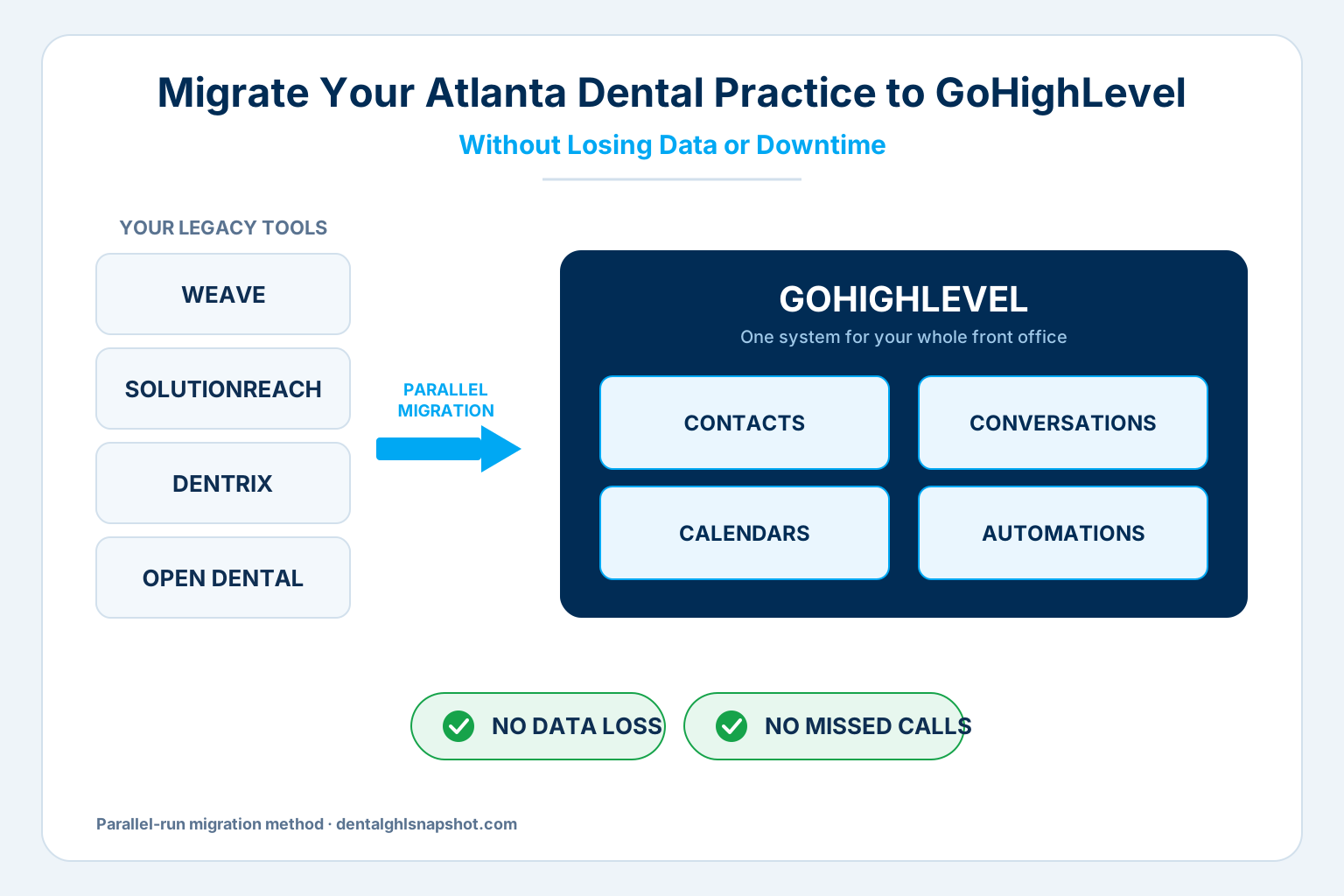
Table of contents
- Why Atlanta dental practices are moving to GoHighLevel
- The two things that actually break in a dental migration
- The 7-step no-downtime migration playbook
- What actually moves over
- Migration mistakes that cause data loss
- DIY vs done-for-you migration
- How to get started in Atlanta
- FAQ
Why Atlanta dental practices are moving to GoHighLevel
Atlanta is one of the most competitive dental markets in the Southeast, and it’s getting more so. Georgia has historically had fewer dentists per capita than the national average (Georgia Board of Health Care Workforce) — but that gap is closing fast in metro Atlanta, where new practices, DSO locations, and corporate groups open constantly. Against a national backdrop of 202,485 professionally active dentists, about 59.5 per 100,000 people (ADA Health Policy Institute), the practices that win in Atlanta aren’t the ones with the most software — they’re the ones whose systems actually talk to each other.
That’s the real driver behind the move to GoHighLevel. Most Atlanta practices don’t have one system; they have five: a patient-communication tool like Weave or Solutionreach, a practice-management system like Dentrix or Open Dental, a separate scheduler, a review tool, and a website form that emails the front desk. Each one holds a slice of the patient relationship, and none of them share it. GoHighLevel consolidates the marketing and front-office layer — CRM, two-way SMS, email, calendars, pipelines, reviews, AI chat, and voice — into a single system the whole team works from.
The cost of not consolidating is quiet but constant. Disconnected tools force staff to re-key the same patient into multiple systems, and workers lose an estimated 1.5+ hours a week to manual and duplicate data entry across disconnected apps (ProcessMaker, 2024). Multiply that across a front desk and it’s a part-time salary spent copying data between screens instead of booking patients.
The two things that actually break in a dental migration
Every migration horror story comes down to one of two failures. Get both right and the rest is logistics.
1. Data loss
Migrations fail on data far more often than on software. Industry research has found for years that the majority of data-migration projects run over budget, slip their schedule, or fail outright — with estimates as high as 75–83% (Gartner / Bloor Research). The culprit is almost never the export button; it’s dirty data going into the new system. Duplicate patient records, mismatched phone formats, half-empty custom fields, and appointment history that doesn’t map cleanly all survive the move and then quietly corrupt your automations.
That’s expensive on its own. Poor data quality already costs the average organization about $12.9 million a year (Gartner) — and while a single practice isn’t losing millions, the mechanism is identical: a recall reminder that fires to a wrong number, a “new patient” nurture that texts an existing patient, a birthday campaign to someone who moved away three years ago. Bad data doesn’t just sit there; it acts. The fix is to treat the export as the start of the project, not the end: de-duplicate, standardize formats, and validate before a single record enters GoHighLevel.
2. Downtime
The second failure is the gap — the hours or days when the old system is off and the new one isn’t fully live. In a dental practice, downtime doesn’t look like a spinning error page. It looks like a phone that rings to nowhere and a website form that emails a mailbox no one is watching. Given that roughly 38% of inbound dental calls already go unanswered (Peerlogic), even a half-day of switch-over confusion can send a stack of new-patient calls straight to a competitor two exits up I-285.
And the leads you do capture during a messy cutover get answered slowly, which is its own tax. The research here is unusually clear: responding to a web lead within an hour makes you about 7× more likely to qualify it, and 60× more likely than waiting 24 hours (Harvard Business Review); tighten that to 5 minutes versus 30 and you’re 21× more likely to qualify the lead (MIT / InsideSales). A migration that drops your response speed for a week is a migration that leaks patients.
Relative odds of qualifying a lead, 5-minute vs. 30-minute first response — the speed you must protect during a switch. Source: MIT / InsideSales Lead Response Management study.
The good news: both failure modes are solved by the same discipline — run the old and new systems in parallel and never leave a gap. That’s the spine of the playbook below.
The 7-step no-downtime migration playbook
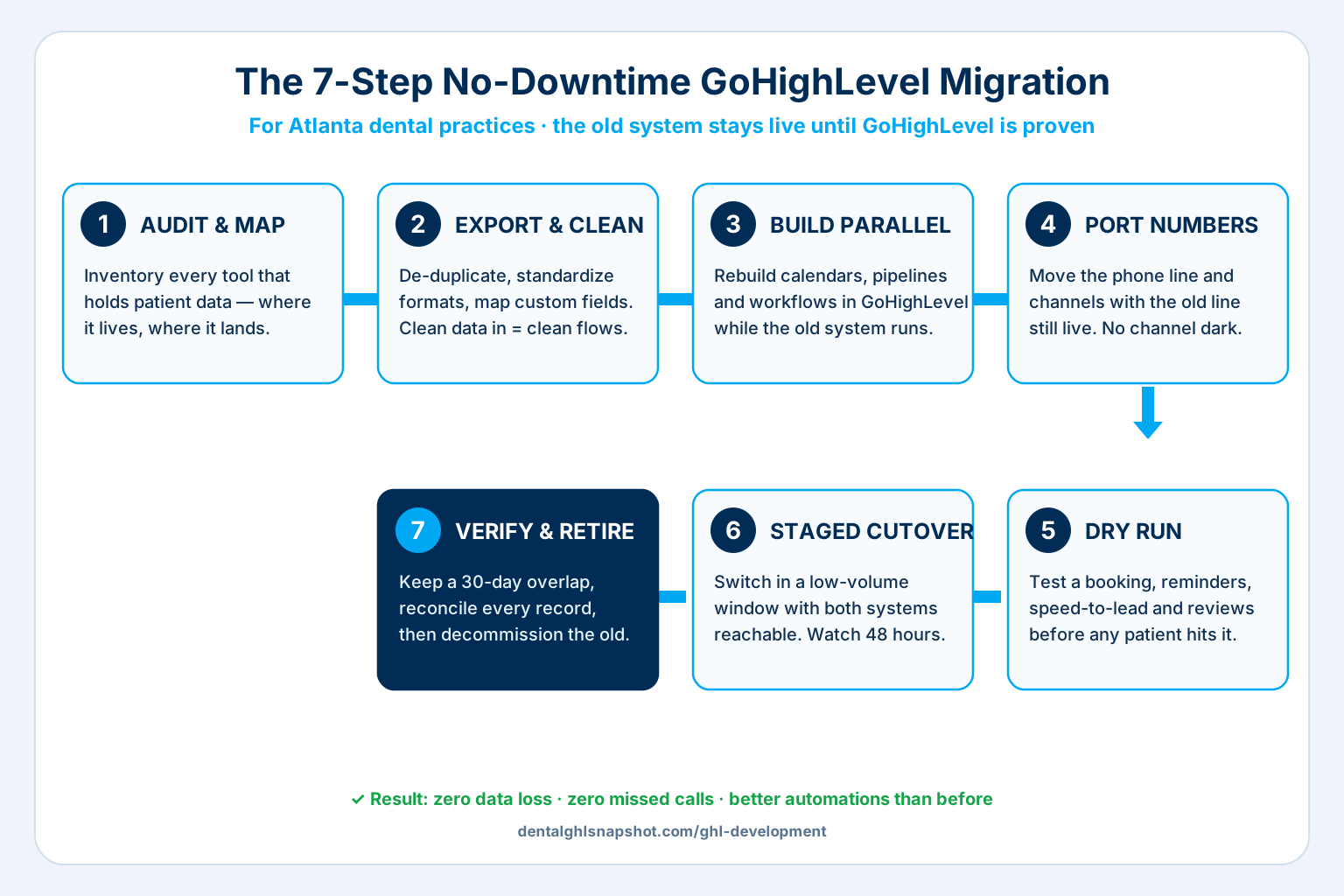
This is the exact sequence we use when we migrate an Atlanta practice to GoHighLevel. The whole point is that your existing system stays fully live until the new one is proven — so patients never notice a thing.
Step 1 — Audit and map your current stack
Before you move anything, inventory what you actually have. List every system that touches a patient: your practice-management software (Dentrix, Open Dental, Eaglesoft, Curve), your communication tool (Weave, Solutionreach, Podium), your scheduler, your review platform, your website forms, and any spreadsheets the front desk secretly runs the practice on. For each, write down what data lives there and where it needs to land in GoHighLevel — contacts, appointment history, pipelines, conversation threads, and automations. This map is the blueprint for the entire migration; skip it and you will discover an orphaned data source the week after cutover.
Step 2 — Export and clean the data
Export everything to a structured format (usually CSV), then clean it before it goes anywhere near the new system. This is the step that actually determines whether the migration succeeds. De-duplicate patients, standardize phone numbers to a single format, fix broken email addresses, and map your custom fields deliberately (insurance, provider, recare status, treatment interest). Clean data in is the difference between automations that work on day one and a recall engine that texts the wrong patients for a month.
Step 3 — Build GoHighLevel in parallel
Now build the new home while the old one is still fully operational. Create the GoHighLevel sub-account and rebuild your calendars, pipelines, and — critically — your workflows: appointment reminders, no-show recovery, recall and recare cadences, speed-to-lead follow-up, and review requests. Don’t copy your old flows blindly; this is the moment to improve them. Import the cleaned data into this parallel environment and confirm every field mapped correctly. Nothing is switched on for real patients yet.
Step 4 — Port numbers and connect channels
Your phone number and messaging channels are the highest-risk items, because that’s where downtime becomes missed calls. Port your existing number (or connect it) with the old line still receiving, connect your Google Business Profile, website forms, Facebook and Instagram, and email sending domain, and verify each one delivers into GoHighLevel. The rule: no channel goes dark. If a number port needs a window, schedule it for the lowest-volume hour and keep call forwarding in place as a safety net.
Step 5 — Test with a dry run
Before real patients hit the new system, run it against yourself. Book a test appointment and confirm the reminder sequence fires on the right cadence. Submit your own website form and confirm the speed-to-lead text arrives in seconds. Send a test review request. Trigger a no-show and confirm recovery kicks in. Walk the front desk through the new inbox so they’re comfortable before it’s live, not during a busy Monday.
Step 6 — Staged cutover in a low-volume window
Now flip the switch — deliberately, in a low-volume window (for most Atlanta practices, a Friday afternoon or a scheduled closure). “Staged” means the old system stays reachable while GoHighLevel becomes the system of record. Route new inbound to GHL, keep the legacy platform in read-only reach for a short overlap, and have someone watching both for the first 48 hours. Because the new system was already tested and the data already clean, there’s no scramble — just a controlled handoff.
Step 7 — Verify and decommission the old system
Keep both systems live for a 30-day overlap. Reconcile that every contact, conversation, and upcoming appointment made it across, monitor that automations are firing correctly, and catch any edge case (the one patient with three duplicate records, the workflow that referenced an old custom field). Only when the new system has run a full recall and reminder cycle clean do you export a final backup and shut the old platform down. That overlap is your insurance policy — and it’s exactly why nothing is ever lost.
What actually moves over
A proper GoHighLevel migration isn’t just a contact dump. Done right, five categories move across intact:
| Data type | What moves | Why it matters |
|---|---|---|
| Contacts & patients | Names, numbers, emails, tags, custom fields (insurance, provider, recare status) | The core asset — clean, de-duplicated, and correctly mapped so automations target the right people |
| Conversation history | Past SMS/email threads with patients | The front desk keeps context; patients never have to repeat themselves |
| Calendars & appointments | Upcoming appointments, provider calendars, booking rules | No one falls off the schedule; reminders keep firing without a gap |
| Pipelines | New-patient, treatment-plan, and reactivation stages | Your follow-up logic survives the move instead of resetting to zero |
| Automations | Reminders, recall, speed-to-lead, review requests | Rebuilt and improved in GHL, not lost — the practice runs better after, not just the same |
This is precisely the scope of a professional migration: contacts, pipelines, conversations, calendars, and automations, with nothing left behind and no downtime. If any of those five is missing from a migration plan, the plan isn’t finished.
Migration mistakes that cause data loss
Most lost-data disasters trace back to a short list of avoidable mistakes:
- Big-bang cutover. Turning the old system off and the new one on the same day, with no overlap. This is the single most common cause of both data loss and downtime — and it’s entirely optional.
- Importing dirty data. Skipping the de-duplication and standardization step in Step 2, then wondering why automations misfire. Garbage in, garbage automated.
- Forgetting the “shadow” data. The spreadsheet the office manager keeps, the notes field in the old system, the recare list in someone’s inbox. If it’s not in the Step 1 map, it doesn’t migrate.
- Porting the number without a safety net. Moving the phone line with no call forwarding and no dry run, so a port delay becomes a day of missed calls.
- No verification window. Shutting the old system down immediately. Without the 30-day overlap, you find the missing records only when a patient complains.
DIY vs done-for-you migration
You can absolutely migrate to GoHighLevel yourself — the question is whether the practice can afford the learning curve during a live switch. Here’s the honest comparison for an Atlanta practice:
| DIY migration | Done-for-you migration | |
|---|---|---|
| Data cleaning | You de-duplicate and map fields manually | Handled and validated before import |
| Workflow rebuild | You learn GHL while rebuilding recall, reminders, speed-to-lead | Rebuilt and improved by people who do it daily |
| Downtime risk | High if you cut over without a parallel run | Near zero — parallel run is the default method |
| Time to live | Weeks to months, around patient care | Scoped timeline, front desk stays focused on patients |
| When it’s right | Small contact list, staff time to spare, simple stack | Multi-system stack, active schedule, or a DSO/group |
DIY makes sense for a single-provider practice with a small, clean contact list and time to learn. The moment you’re moving off multiple systems, carrying years of appointment history, or running more than one location, the parallel-run method gets hard to execute solo — and that’s where a done-for-you migration pays for itself by removing the downtime risk entirely. If you’d rather own a complete system from day one, our done-for-you dental snapshot installs 11 GHL features in 24 hours; a custom migration is the better fit when you’re carrying real data across from legacy tools.
How to get started in Atlanta
The path is straightforward, and you don’t need to know GoHighLevel to start:
- Map your stack. List every tool that holds patient data today (see Step 1). This one artifact makes the whole project quotable.
- Get a migration scope. With our GHL Development & Migration service, a 30-minute call turns that map into a fixed-price scope with milestones and a timeline — no moving targets.
- Migrate in parallel. We build and test GoHighLevel alongside your live system, port channels with safety nets, and cut over in a low-volume window.
- Run the 30-day overlap. Both systems stay reachable while we reconcile every record and prove the automations. Then we decommission the old platform.
The goal is simple: on the day you go live, the phones still ring into a system that answers, every patient record is exactly where it should be, and your recall and follow-up run better than they did before — not the same, and definitely not broken.
Frequently asked questions
Will my Atlanta practice have downtime during the GoHighLevel migration?
No — not if it's done with a parallel run. The old system stays fully live while GoHighLevel is built and tested alongside it. Phone numbers are ported with call forwarding as a safety net, and the cutover happens in a low-volume window with both systems reachable. Because roughly 38% of dental calls already go unanswered, avoiding a switch-over gap is the whole point of the method.
What data actually moves from Weave, Solutionreach, or Dentrix to GoHighLevel?
Contacts and patient records (with custom fields like insurance, provider, and recare status), conversation history, calendars and upcoming appointments, pipelines, and automations. A proper migration carries all five — cleaned and de-duplicated on the way in — so nothing is left behind and your follow-up logic survives the move.
How do you prevent data loss?
Three ways: clean the data before import (de-duplicate, standardize formats, map custom fields), run a dry run to verify every field landed correctly, and keep the old system live for a 30-day overlap so any edge case is caught and reconciled before the old platform is shut down. Most migrations fail on dirty data and rushed cutovers — industry research puts the failure/overrun rate as high as 75–83% — and both are avoidable.
How long does a dental GoHighLevel migration take?
It depends on how many systems you're moving off and how much history you're carrying, which is why we scope every migration up front with a fixed timeline. A single-system move is faster than consolidating five tools with years of appointment history. The 30-day verification overlap runs regardless, because that's what guarantees nothing is lost. See our GHL Development & Migration page for how scoping works.
Do I have to run GoHighLevel myself after we migrate?
No. You can run it in-house, hand it to a dental-trained GHL VA, or have us maintain it. If you'd prefer to skip the migration entirely and start fresh, our done-for-you dental snapshot installs 11 GHL features in 24 hours — a migration is the right call specifically when you're carrying existing patient data across from legacy tools.
Written by Devin Okafor, GoHighLevel Automation Specialist based in Austin, Texas. Devin builds and ships GoHighLevel snapshots and custom migrations for dental practices and the agencies that serve them, and is opinionated about keeping automations simple enough to maintain. This article is educational and does not constitute a guarantee of specific rankings, migration outcomes, or revenue.
Related reading: GoHighLevel for Dentists · Dental CRM: What It Is and How to Choose · Speed-to-Lead for Dental Practices · Missed-Call Text-Back for Dental · Dental GHL Snapshot vs Building It Yourself